

nascarmike
Members
-
Joined
-
Last visited
-
 I like the look on the guys face sitting next to her.
 -
Little Hitler???
-
Somebody's got some splainin to do.
-
Got a couple of those too.
 Anybody catch this one? Forrest Gupm
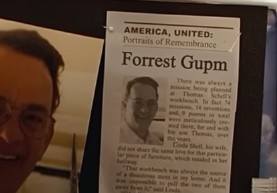 Gotta be AI. Yes, the "Forrest Gump 2" concept trailer circulating online is largely AI-generated and fan-made. It uses AI to create voiceovers and modify footage to resemble Tom Hanks and Timothée Chalamet, portraying them in a potential sequel. However, there is no official "Forrest Gump 2" movie in development, and the trailer is not a reflection of an actual production.
Maybe even a refugee dog.
Don't forget about meeee....!
Gotta be AI. Yes, the "Forrest Gump 2" concept trailer circulating online is largely AI-generated and fan-made. It uses AI to create voiceovers and modify footage to resemble Tom Hanks and Timothée Chalamet, portraying them in a potential sequel. However, there is no official "Forrest Gump 2" movie in development, and the trailer is not a reflection of an actual production.
Maybe even a refugee dog.
Don't forget about meeee....! Hell, the Dems are not likely to support Fetterman for another Senate term let alone Pres.
12 were used on Fordow and 2 on Natanz.
Dan Cain just said that there were 14 bunker busters used.
Would you like an order of Tomahawks with that sir?
Fetterman wanted to take out the Ayatollah.
Hell, the Dems are not likely to support Fetterman for another Senate term let alone Pres.
12 were used on Fordow and 2 on Natanz.
Dan Cain just said that there were 14 bunker busters used.
Would you like an order of Tomahawks with that sir?
Fetterman wanted to take out the Ayatollah.