Jump to content
View in the app

A better way to browse. Learn more.

FreedomSledder.com

A full-screen app on your home screen with push notifications, badges and more.

To install this app on iOS and iPadOS
  1. Tap the Share icon in Safari
  2. Scroll the menu and tap Add to Home Screen.
  3. Tap Add in the top-right corner.
To install this app on Android
  1. Tap the 3-dot menu (⋮) in the top-right corner of the browser.
  2. Tap Add to Home screen or Install app.
  3. Confirm by tapping Install.
  • USA Donating Member

This could be fun if the snow lasts on the ski hill…

IMG_7404.jpeg

  • Replies 6
  • Views 1.2k
  • Created
  • Last Reply

Top Posters In This Topic

Most Popular Posts

  • I wanted to go to that hill event at giants ridge last weekend but was too busy, hopefully next year. It looks like a blast

Posted Images
Featured Replies

  • USA Donating Member

Are they planning on running on dirt? They are closed already

  • Author
  • USA Donating Member

That’s my fear… I think this is something thrown together in hopes of the base lasting, but 3 more weeks? Gonna be tough. The snow lasts a quite a while there but 70+ and rain all weekend? Ugh

  • USA Donating Member

Hope it works somehow. I'll be back from Europe and that is a short drive away.

  • 3 weeks later...
  • Author
  • USA Donating Member

Going fast… not sure it makes another week, definitely have to move snow if it does.

4199842373322771588.jpeg

  • Author
  • USA Donating Member

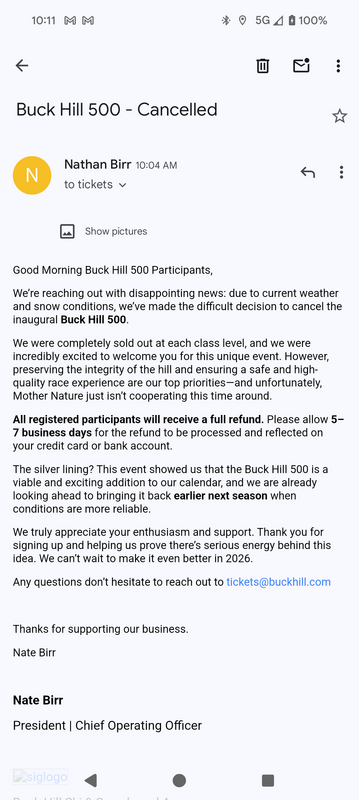
Better luck next year I guess…

4135199347767437021.png

I wanted to go to that hill event at giants ridge last weekend but was too busy, hopefully next year. It looks like a blast

Join the conversation

You can post now and register later. If you have an account, sign in now to post with your account.
Note: Your post will require moderator approval before it will be visible.

Guest
Reply to this topic...

Recently Browsing 0

  • No registered users viewing this page.

Configure browser push notifications

Chrome (Android)
  1. Tap the lock icon next to the address bar.
  2. Tap Permissions → Notifications.
  3. Adjust your preference.
Chrome (Desktop)
  1. Click the padlock icon in the address bar.
  2. Select Site settings.
  3. Find Notifications and adjust your preference.